How to Buy BitCash from Overseas: Step-by-Step Guide
Last updated
PR: this page contains affiliate links. What this site earns from them.
If you've tried to look up BitCash and landed on a Japanese-language site with no obvious way to buy from abroad, this is the route through a reseller, laid out step by step. The facts on this page come from BitCash's own site, Playasia's product page, and MyFans' help pages, all checked on 11 October 2026.
What BitCash actually is
- BitCash is a Japanese prepaid e-money. BitCash describes it as pay-in-advance, so you buy only the amount you need, and usable without a credit card.
- Every BitCash purchase gives you a 16-character code. The code is written in hiragana — Japanese characters — not digits, so you copy and paste it rather than type it. There's no bank account tied to the code itself.
- It's accepted well beyond MyFans. Playasia's own listing names Japanese services such as DMM, DLsite, and Fantia among the places a code can be spent. It is only accepted on Japanese sites.
Why you can't just buy it directly
- BitCash's own site sells it two ways: over the counter at convenience stores and other shops in Japan, or online after registering as a member, paying by credit card, online banking, convenience-store payment, PayPay, direct debit, or bank transfer. The site is in Japanese. It doesn't say whether a card issued outside Japan is accepted, and this site hasn't tried one.
- This is exactly the gap international resellers like Playasia fill: you don't need a Japanese bank account to get a working code, and it's delivered digitally rather than requiring any physical pickup.
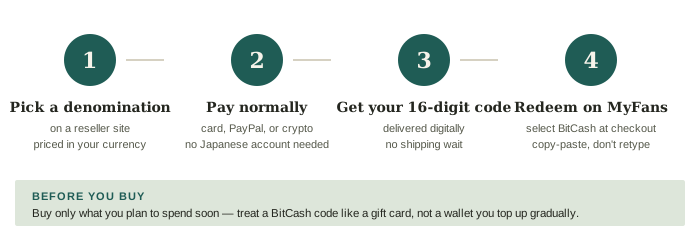
Step-by-step purchase via Playasia
- Go to Playasia's BitCash listing and search "BitCash" if it's not already on the page — Playasia lists it as a digital code, priced in the currency you've set on its site.
- Select your denomination. BitCash codes come in fixed amounts — Playasia lists ¥1,000, ¥2,000, ¥3,000, ¥5,000, ¥10,000, and ¥20,000. Pick the one closest to (but above) what you actually plan to spend.
- Add to cart and check out. Unlike the Japanese-only BitCash storefront, Playasia's payment page lists Visa and Mastercard, PayPal, and Bitcoin, and says the options you're shown depend on your location and the type of order. So a card that MyFans declines may still go through here — look at what the checkout actually offers you.
- Receive your code instantly. Digital delivery means the code lands in your account or inbox almost immediately after payment clears — there's no shipping wait since it's not a physical product.
- Redeem the code on MyFans. At checkout, select BitCash as your payment method and enter the code exactly as delivered. It's in hiragana, so copy it from your Playasia order page and paste it — no Japanese keyboard needed.
A few things to know before you buy
- You pay more than face value. A reseller charges a margin. On 11 October 2026, Playasia listed the ¥1,000 code at ¥1,300. Check the listed price against the face value before you buy, and count the difference as part of what MyFans costs you.
- Codes expire and can't be refunded. Playasia states that BitCash codes issued from 1 April 2026 expire one year after issue, and that they're non-refundable. BitCash's own site says its new codes last one year or three, depending on the type. Buy only the amount you intend to spend soon — treat it like a gift card, not a wallet you top up gradually.
- Holding an older code? It stops working on 16 November 2026. BitCash is withdrawing its old codes — the ones with a ten-year expiry, sold from October 2022 to May 2026 — at 11:00 Japan time that day. Before then you can spend it, or exchange it on BitCash's site for a new three-year code. BitCash has a page for checking whether a code is one of the old ones.
- BitCash doesn't cover everything on MyFans. MyFans accepts it for plans, single posts, and MyFans Premium, but not for tips or Super Comments. MyFans also says a creator's first-month discount doesn't apply to BitCash payments.
- Keep the confirmation email until the code is fully redeemed, in case you need to reference it for support.
- If you're also dealing with a declined card on MyFans directly, this workaround solves that too — see the payment troubleshooting guide for the full picture.
Where to go next
- New to MyFans entirely? Start with What Is MyFans?
- Still deciding between platforms? Check the MyFans vs OnlyFans comparison.
- Redeem your code on MyFans (affiliate link)