MyFans Payment Failed or Not Working? How to Fix It From Outside Japan
Last updated
PR: this page contains affiliate links. What this site earns from them.
Short answer: MyFans lists five payment methods. Two of them are open to fans outside Japan: a card (Visa, Mastercard or JCB), though some cards are refused, and BitCash. The other three need a Japanese phone number that can receive SMS. If your card is refused, MyFans' own advice is to use a different payment method.
This guide sets out what MyFans itself says about cards that fail, which payment methods it accepts, what to try, and how to register in the first place. Checked against MyFans' help pages on 10 and 11 October 2026.
Yes, MyFans works outside Japan
- MyFans says the display language can be changed from a language setting, so the language barrier that trips people up on other Japanese platforms is less of an issue here. Its help pages don't list which languages are offered.
- Fan-side registration only needs an email address or X account — no Japanese ID and no passport.
- Paying is a different step. MyFans requires a name and a verified phone number before any payment. Its help page doesn't say whether numbers from outside Japan are accepted. Verification is by SMS or voice call, and Japanese 050 numbers are refused. Check that step works for you before buying a prepaid code.
- The friction point is entirely on the payment side, not registration.
Payment methods MyFans accepts
MyFans' help page lists five payment methods. Three of them need a Japanese phone number that can receive SMS, which leaves cards and BitCash for most fans abroad.
| Method | Plans | Premium membership | Single purchases | Tips and Super Comments | From outside Japan |
|---|---|---|---|---|---|
| Card (Visa, Mastercard, JCB) | Yes | Yes | Yes | Yes | Yes, though some cards are refused |
| BitCash | Yes | Yes | Yes | No | Yes, with a code from an overseas reseller |
| Paidy (pay later) | Yes | Yes | Yes | Yes | No: Japanese SMS number required |
| atone (pay next month) | Yes | Yes | Yes | No | No: Japanese SMS number required |
| Deferred payment (convenience store or ATM) | Yes | Yes | Yes | No | No: Japanese SMS number required |
- PayPal isn't on the list.
- Paying in a foreign currency. MyFans says the exchange rate is the one your card company sets, and that the card company may add its own overseas transaction fee. MyFans doesn't quote a rate. Ask your card issuer.
- BitCash and first-month discounts. MyFans notes that a creator plan's first-month discount doesn't apply when you pay with BitCash.
Why a MyFans payment fails (what MyFans says)
- Cards from abroad are accepted in general. MyFans' help page for overseas users says the service takes card payments and can be used from outside Japan.
- Some cards still won't go through. MyFans says a particular card can be unusable because of the payment system company it works with — including a card that works everywhere else, or one that worked on MyFans before.
- MyFans doesn't decide which. It says which cards are accepted is entirely the payment company's decision, and that it can't tell you which cards work or why one doesn't.
- The message MyFans quotes. Its help page gives the on-screen wording in Japanese: 「ご利用可能なカードが登録されていません。」, roughly "No usable card is registered". MyFans lists it for a card that suddenly stops working at purchase. The page gives only the Japanese text, so the English screen may word it differently.
- Card type isn't the test. Credit, debit and prepaid cards are all accepted in principle — MyFans adds that a card may be refused "depending on the state of the card".
So a failed payment tells you something about that card and that payment company. It says nothing about your balance. MyFans' own advice for this case is to use a different payment method.
What MyFans doesn't publish: a list of card issuers or countries that work. Its help pages for fans also don't mention 3D Secure.
What to try, in order
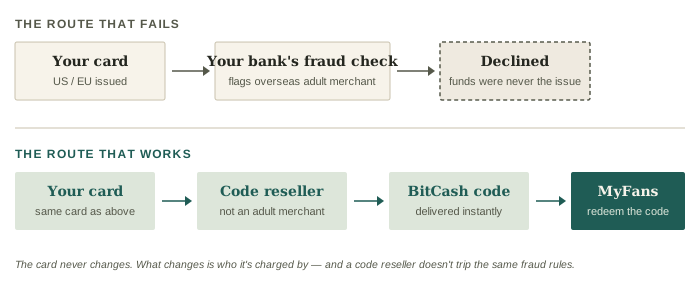
- Use a different payment method: BitCash. This is the remedy MyFans itself points to. MyFans accepts BitCash, a Japanese prepaid e-money code. You can buy a BitCash code from an international reseller (e.g. Play-Asia) using your regular Visa, Mastercard, or PayPal (all three are on Playasia's payment page, which adds that the options vary by location). The charge on your card then comes from a games and digital-code shop rather than from MyFans, which is why this route can work when a direct payment doesn't. You then redeem the BitCash code directly on MyFans. Playasia's own listing names DLsite and Fantia among the other Japanese sites where a code can be spent. See the full BitCash purchase walkthrough for exact steps.
- Try a different card. MyFans lists Visa, Mastercard, and JCB as the card brands it accepts. Because the payment company decides card by card, a second card from a different issuer is worth one attempt.
- Ask your bank whether it refused the charge. MyFans puts the decision with its payment company, but a bank can also turn down an overseas charge on its own. Your bank can tell you whether the attempt reached it. If it did and was refused, ask them to allow it. If it never arrived, the bank can't fix it — go back to step 1.
If a plan renewal fails: MyFans marks the plan "payment failed" and paid posts stop being viewable. You have 14 days to change the payment method and pay again; after that the plan is cancelled automatically. This applies to plans paid by card (MyFans help page, updated 8 October 2026). A renewal is charged to the card you used when you first joined the plan, even if another card is now your default.
Don't bother trying: PayPal. It isn't among the payment methods MyFans lists. PayPal's own Acceptable Use Policy (US version) puts digitally delivered adult content on its list of activities that need PayPal's approval in advance. The pay-later options MyFans does list — Paidy, atone, and deferred payment at a convenience store or ATM — are no help from abroad either: MyFans says they're only for users with a Japanese phone number that can receive SMS. Both checked on 10 October 2026.
Step-by-step registration walkthrough
- Go to the English version of the site.
- Register with an email address or X account.
- Browse creators and select a subscription or PPV purchase.
- Before your first payment, enter your name and verify a phone number by SMS or voice call. MyFans doesn't allow a charge until that's done. If the verification screen shows an error, turn off any page translation and try again — MyFans names Google Translate as a cause.
- Enter card details — if the payment fails, follow the fixes above.
- Try signing up now (affiliate link)
FAQ
- Does MyFans accept PayPal? — No. It isn't among the payment methods MyFans lists, and PayPal's own policy requires its advance approval for digitally delivered adult content.
- Does MyFans accept debit cards? — In principle, yes. MyFans says credit, debit and prepaid cards can all be used, and adds that a card may be refused depending on its status.
- Is MyFans legit / is it safe to enter card details? — Yes. MyFans operates as a registered platform under Japan's adult-content business regulations, not an unregulated site, and standard 18+ age verification applies at signup. You're paying a registered operator through a normal card-processing flow, the same as any other subscription platform.
- Can I use a VPN to sign up? — MyFans' help pages don't mention VPNs, so there's nothing official either way. A VPN doesn't change which card you pay with, and the card is what gets accepted or refused. If a payment won't go through, start with the steps above.