Is MyFans Private? What Creators See and What They Don't
Last updated
PR: this page contains affiliate links. What this site earns from them.
This page is about what a creator — and the platform itself — can see about you as a paying fan. It was checked on 11 October 2026 against MyFans' help pages and its privacy policy (revised 9 October 2026). One thing to know up front: neither of them lists what a creator can see about a fan. Where this page says what creators see, it says what that rests on.
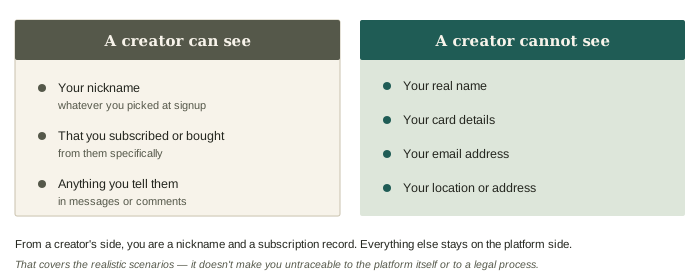
What creators can see
MyFans doesn't publish this list. These three follow from how the site works: a fan appears under a display name, a creator runs their own plans and sales, and messages go to the creator.
- Your display name (nickname). Whatever you chose at signup is what shows up when you subscribe, comment, or message. Your real name isn't required to register in the first place.
- That you subscribed or bought something. A creator manages their own plans and sales, so assume they can tell which accounts are subscribed and what was bought from them. The analytics MyFans describes for creators are totals — new subscribers, cancellations, viewing time — not personal details.
- Anything you tell them directly. Messages and comments are the main way fans accidentally reveal identifying details.
What creators cannot see
MyFans' privacy policy says it won't hand your personal information to a third party without your consent, and lists the exceptions: a legal requirement, a request from police, prosecutors or lawyers for an investigation, its affiliated companies, contractors it outsources work to, and payment processors. Creators aren't on that list. That is the basis for the four items below.
- Your real name — you give it to MyFans when you pay, not to the creator.
- Your card details — the policy has MyFans passing information to a payment processor as far as the service needs. Nothing in it sends payment data to creators.
- Your email address — this stays between you and the platform.
- Your phone number — collected for payment verification, on the same terms.
The short version: from a creator's side, you're a nickname and a subscription record. Everything else stays on the platform side.
Keeping your account genuinely anonymous
Registration only needs an email or an X account, so the weak points aren't the platform's data handling — they're the choices you make at signup:
- Pick a nickname that isn't tied to you anywhere else. Reusing a handle you use on other sites is the most common way people link accounts back to themselves.
- Use a separate email address. If you sign up with the address you use for work or personal mail, that address is now associated with the account.
- Be careful with X sign-in. Registering through an X account you already use publicly links the two more tightly than an email signup does. If anonymity matters, email is the safer route.
- Watch what you say in messages. No platform-level privacy protects you from mentioning your city or job in a DM.
- Treat likes, follows and comments as visible. MyFans' help pages say anyone can like a post, and comments sit under the post. This site hasn't checked who can see your likes or the accounts you follow, so don't rely on them being hidden.
- You can block a creator. Blocking hides your messages with them and removes their follow of you. It's under the menu on their profile.
What the platform itself holds
MyFans is run by Rise Inc. (株式会社Rise), and its privacy policy is governed by Japanese law. The policy lists what it collects:
| Collected | Not on the policy's list |
|---|---|
| Name, email address, age or date of birth — what you type into forms | A postal address |
| IP address, access logs, device, OS and browser | |
| What you viewed and what you bought |
- Your IP address is collected, so MyFans does hold a rough idea of where you connect from, even though it doesn't ask for an address.
- To pay for anything, MyFans requires your name and a phone number verified by SMS or voice call.
- Viewing and purchase history is used for more than billing. The policy's stated purposes include marketing analysis and targeted advertising, for MyFans' own and third parties' products. It says you can refuse this by disabling cookies in your browser or opting out with the ad services themselves.
- You can ask what MyFans holds on you. The policy lets you request disclosure, correction, deletion, or a stop to its use. Disclosure costs ¥500 a request; correction and deletion are free.
- Card information is deleted with the account. MyFans' help page says so.
- Your card statement shows "W Myfans" rather than a creator name. The bank statement guide covers what that rests on.
The honest limitation
No account is anonymous against a determined investigation, and MyFans is no exception. What the platform provides is practical privacy: the policy gives a creator no route to your name, card or email. It does not make you untraceable to the platform itself, to your payment provider, or to a legal process — the policy says in so many words that MyFans will disclose personal information when the law requires it or investigators ask.
Sign up anonymously (affiliate link)